

Writing volunteer vacancies: we do the prep work, you decide
Writing a volunteer vacancy often gets pushed to the bottom of the to-do list, even though it determines whether new helpers join your team. With updated AI features, the prep work is done for you. Automatically build your organisation profile and generate tailored recruitment listings while keeping complete control.

How long did you stare at a blank vacancy field last time?
Writing a volunteer vacancy takes time. On Give a Day, our updated AI suggestions now do the prep work. We fill in your organisation profile based on your website and immediately suggest vacancies. Already know who you are looking for? Then we'll write out that specific vacancy for you. You review, adjust and publish.
Log in to Give a Day and try it out
How do you get vacancy ideas for your organisation?
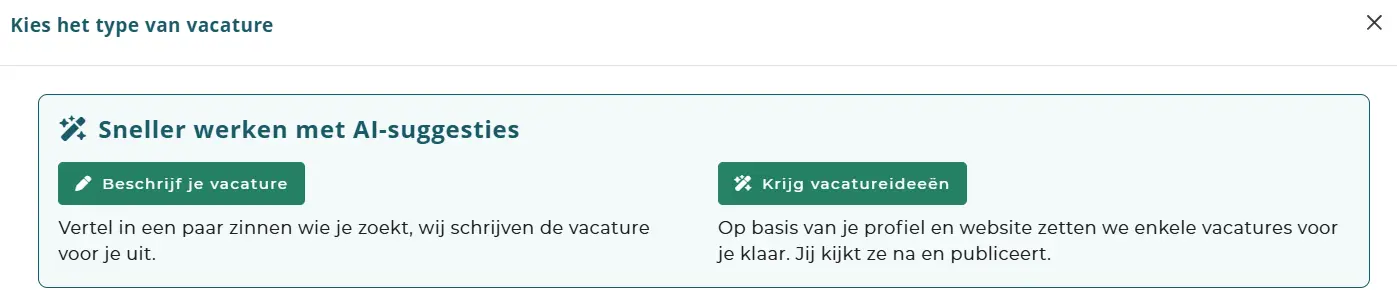
Click on "Get vacancy ideas". After that, it takes two steps.
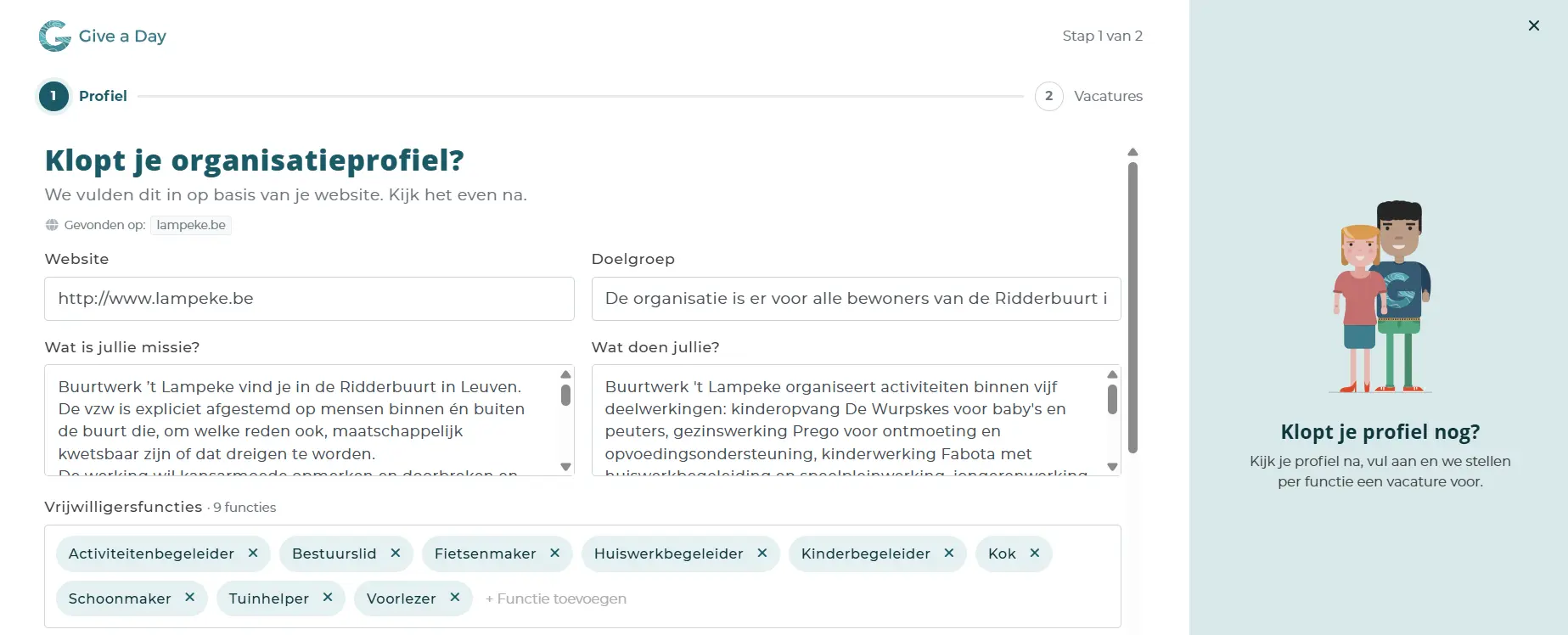
Step 1: your profile is filled in automatically. You enter your website address. We look up your organisation, read your web pages and fill in your profile for you:
your mission
what you do
your target group
the volunteer roles that suit you
the themes you work around
your social media
You will also see on which website the information was found. Is something incorrect? Adjust it. Missing a role? Add it. Does one not belong? Click it away.
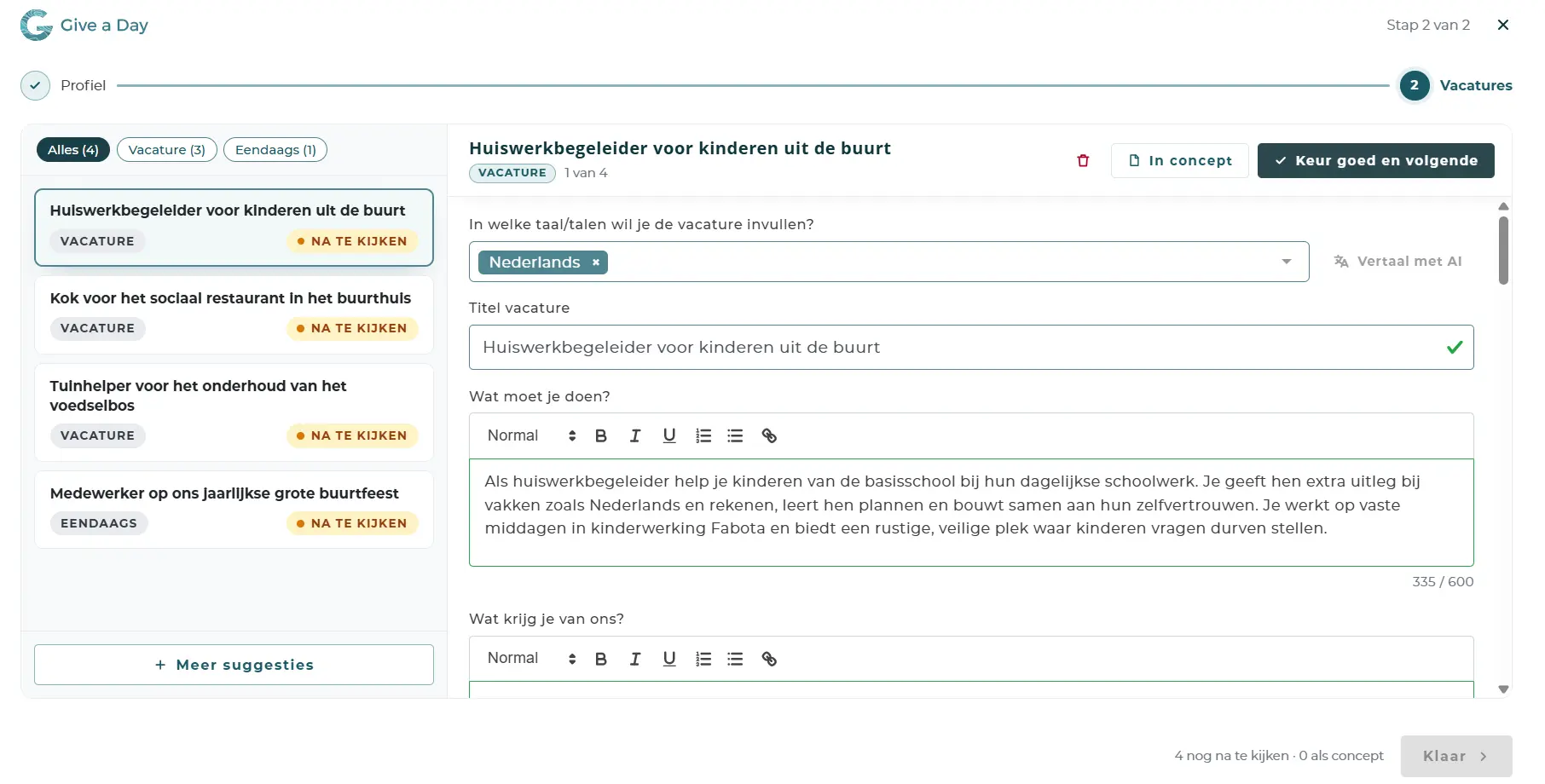
Step 2: have vacancies suggested automatically. Click on "Generate vacancies". Our system analyzes your profile and drafts a suitable vacancy for each role. This usually takes less than half a minute.
Each vacancy gets a title, a description of what the volunteer does and what he or she gets in return. In addition to ongoing vacancies, there can also be a one-day vacancy included. Think of titles like "Help in the kitchen and prepare hot meals" or "Welcome visitors and offer a listening ear".
Why should you review your profile first?
Because a vacancy is only as good as what we know about you. A profile with your own mission and your own words produces vacancies that sound like you, not like a template.
That is also the best tip: take step 1 seriously. Spending two minutes reviewing there saves you rewriting work later.
Do you already know which volunteer you are looking for?
Then you don't need the two steps. Click on "Describe your vacancy" and tell us in a few sentences who you are looking for. We write out the vacancy for you. Afterwards, you review it and adjust where necessary.
Does anything go online without you seeing it?
Every suggested vacancy is initially set to "To review". You approve them, save them as a draft or delete them. Nothing goes online without your approval.
Not satisfied with the suggestions? Ask for more suggestions. Want a vacancy in another language as well? Translate it with one click, and then review it briefly.
Why does that vacancy so often get left behind?
Many organisations run on a few people who handle volunteers on top of everything else. Writing a good vacancy then shifts to the bottom of the list. Even though that very vacancy determines whether someone takes the step.
You remain in control. We give you a starting point so you get online faster.
Frequently asked questions
How long does it take to have vacancies written with AI? Suggesting the vacancies usually takes less than half a minute. After that, you review them.
Where do you get the information about my organisation? From your website and the web. You always see on which website the information was found, and you adjust anything that isn't right.
Do I have to accept the suggested vacancies? No. You approve each vacancy separately, save it as a draft, or delete it.
Your first vacancy is already waiting
Do you already have a profile on Give a Day? Then the feature is ready for you. Log in and have your first vacancies suggested
See you soon!
Related news and stories
From interest to commitment: five types of volunteers and what they need

Connect & Act 2027: Early bird for the National Volunteering Congress
On Tuesday 16 March 2027, the volunteering sector will gather in Brussels for Connect & Act, the National Volunteering Congress. Non-profits, local authorities, and businesses will explore new strategies for volunteer recruitment, retention, and policy. Claim your early bird ticket now for €109 before 5 December 2026.

Volunteer at five organisations: Marc's story
Marc volunteers for five different organisations in Aalst, yet he only has one fixed weekly appointment in his diary. How does he balance multiple commitments without feeling overwhelmed? Discover five practical lessons from Marc on setting boundaries, managing your schedule, and finding joy in volunteering.